Skip to content
NewChatGPT & Claude connectorAsk ChatGPT or Claude about your traffic

All your sites. One screen. Free.

Connect Google once. Every Analytics and Search Console site you own shows up, with what changed and what to fix next.

Explore the live demo
Works with
  • Google Analytics 4
  • Search Console
  • ChatGPT
  • Claude
trafficclaw.com/dashboard

Portfolio

11 sites · last 28 days vs previous

Clicks
410Kdown 3.9 percent versus previous period
Impressions
12.4Mup 0.6 percent versus previous period
CTR
3.3%down 0.2 percentage points versus previous period
Avg. position
16.1down 0.1, better versus previous period
Users
467Kup 1.6 percent versus previous period
Sessions
737Kup 3.2 percent versus previous period

healthinsights.example

37.6Kclicksdown 20.8 percent versus previous period1.61Mimpr.down 3.8 percent versus previous periodpos16.3up 0.2, worse versus previous period
49.3Kusersdown 4.1 percent versus previous period60.6Ksessionsdown 4.1 percent versus previous period
SyncedOct 2 – Oct 29Details

acmeanalytics.example

23.5Kclicksup 13.8 percent versus previous period776Kimpr.up 10.3 percent versus previous periodpos17.3up 0.1, worse versus previous period
47.6Kusersup 9.9 percent versus previous period76.2Ksessionsup 10.6 percent versus previous period
SyncedOct 2 – Oct 29Details

searchmetrics.example

230Kclicksdown 4.0 percent versus previous period6.54Mimpr.down 1.1 percent versus previous periodpos16.8down 0.2, better versus previous period
289Kusersdown 0.9 percent versus previous period464Ksessionsup 0.8 percent versus previous period
SyncedOct 2 – Oct 29Details

Sample dataClick a card to open it in the live demo.

See all 11 sites in the live demo

How it works

Sign in. See everything. Fix the drop.

No script, no setup. Sites appear on their own.

  1. 1

    Connect Google

    TrafficClaw wants to

    • See your Analytics dataanalytics.readonly
    • See your Search Console datawebmasters.readonly

    Read-only. No script on your site.

  2. 2

    Every site appears

    • searchmetrics.example230Kdown 4.0 percent versus previous period
    • recipenest.example85.1Kdown 5.5 percent versus previous period
    • healthinsights.example37.6Kdown 20.8 percent versus previous period
    • acmeanalytics.example23.5Kup 13.8 percent versus previous period

    11 sites · clicks, last 28 days · sample data

  3. 3

    Drops come with a fix

    healthinsights.exampleClicks down 35% · last 3 months

    Fix next

    Push “intermittent fasting” onto the first page

    +18.3K clicks a month at position 5

    See the full fix list
Explore the live demo

Read-only. Nothing to install. No card.

Product tour

One sign-in. Everything you need.

Real screens on sample data. Click around, then open any of them in the live demo.

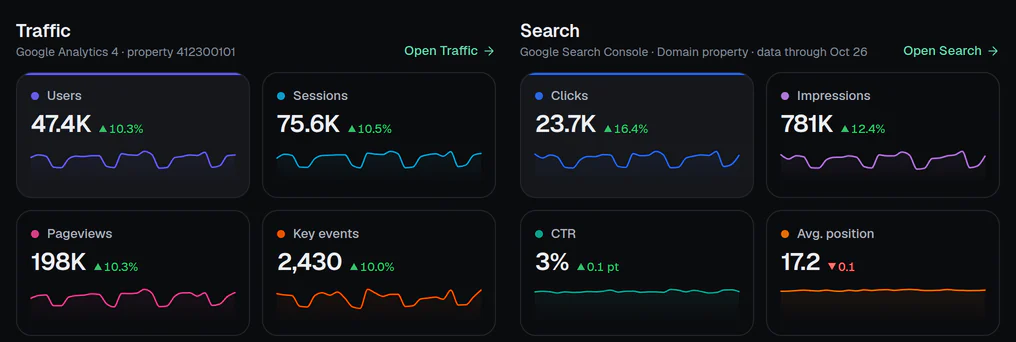
Site page
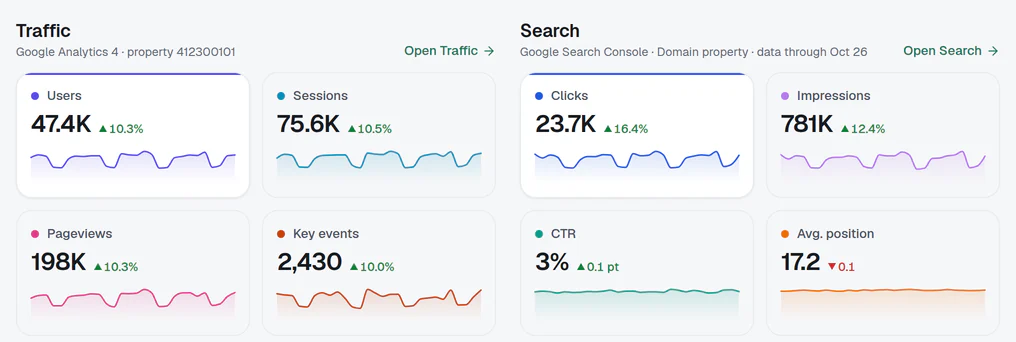
Every number for one site

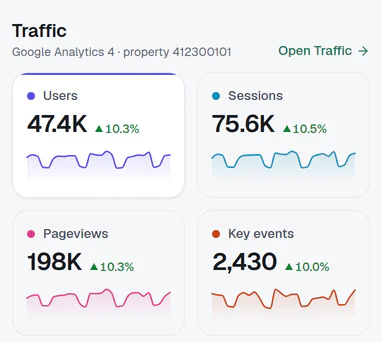
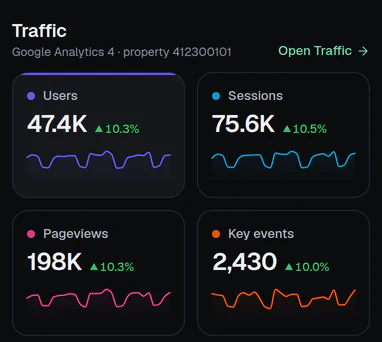
  • Users, sessions, pageviews, key events
  • A trend line on every tile
  • Search Console on the same page
Open a site page
Site overview for acmeanalytics.example: users, sessions, pageviews and key events with trend lines

Traffic & AI

See what ChatGPT sends you

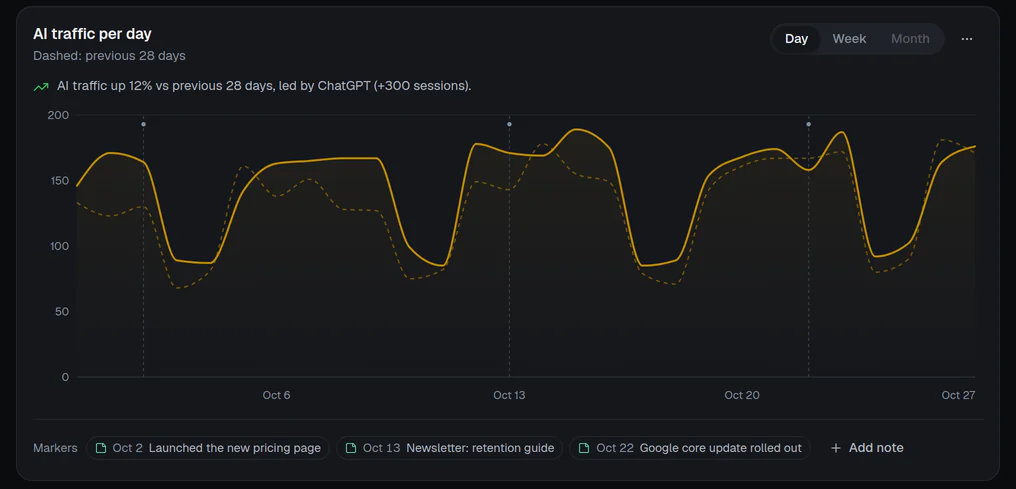
  • AI assistants as their own number
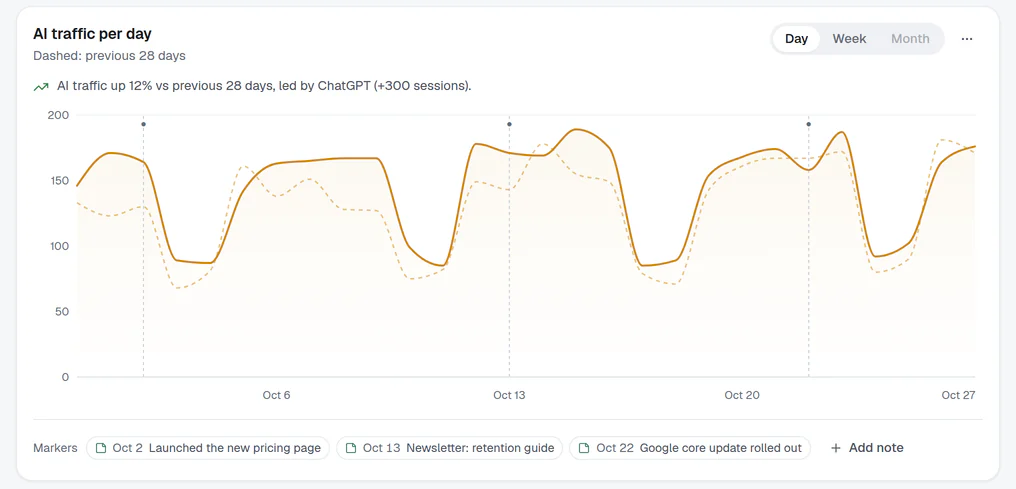
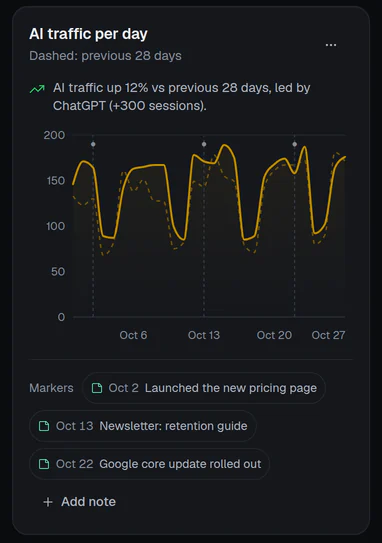
  • Daily chart against the period before
  • Notes and Google updates on the chart
Open Traffic
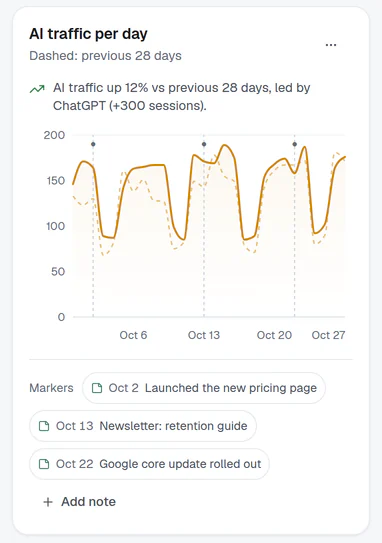
Traffic page: AI traffic per day against the previous period, with notes on the chart

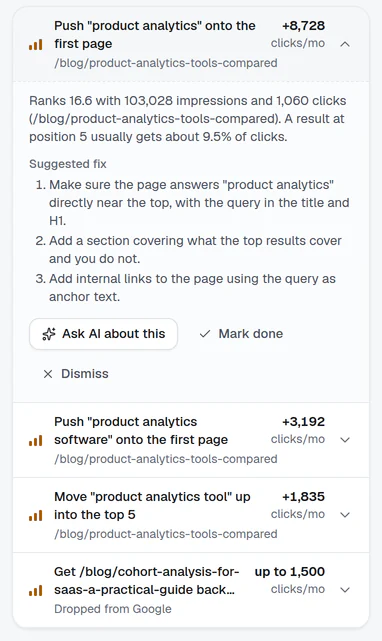
Search fixes

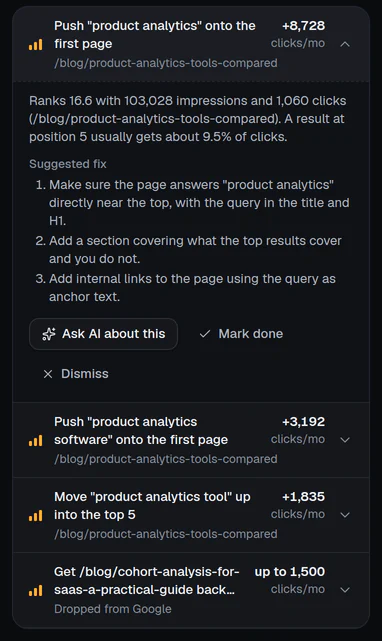
A to-do list ranked by clicks

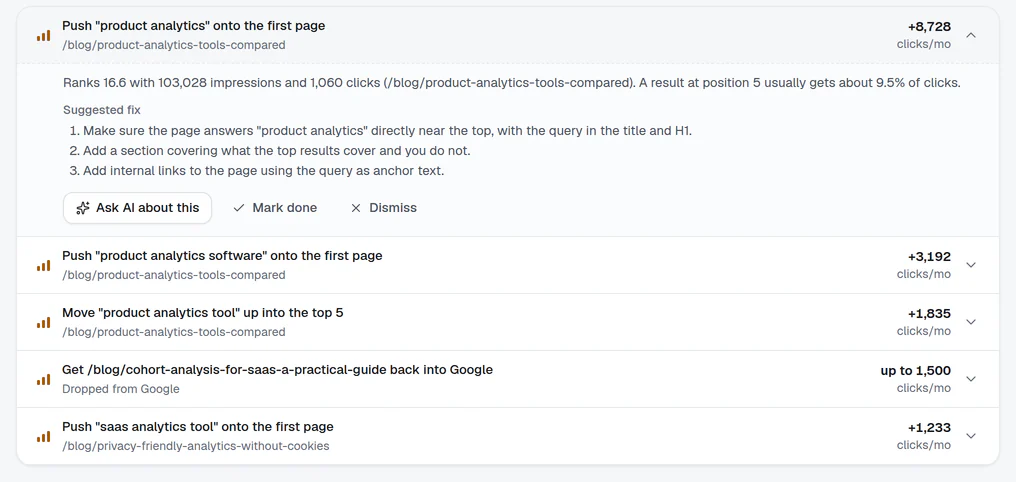
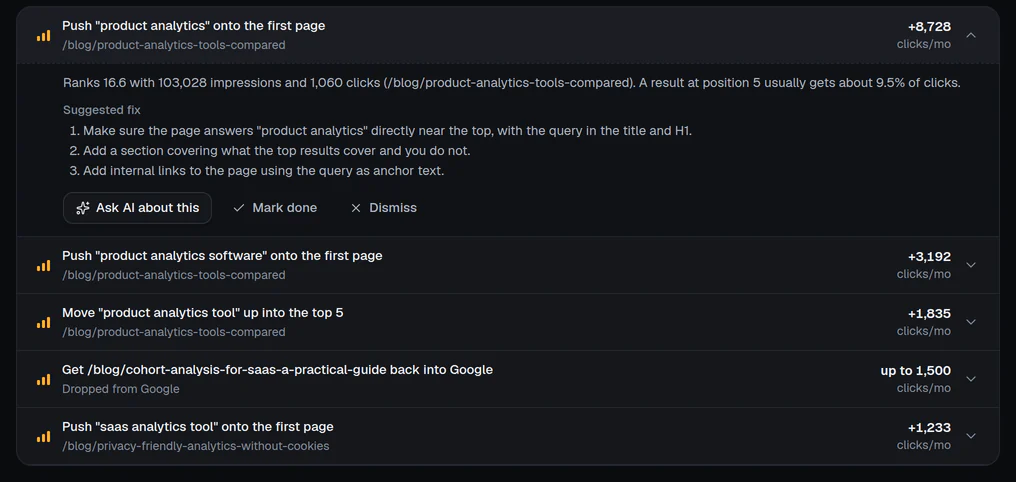
  • Ranked by the clicks it could bring
  • The numbers behind every task
  • A suggested fix, step by step
See what to fix
Actions page: a high-impact task with its numbers and a suggested fix

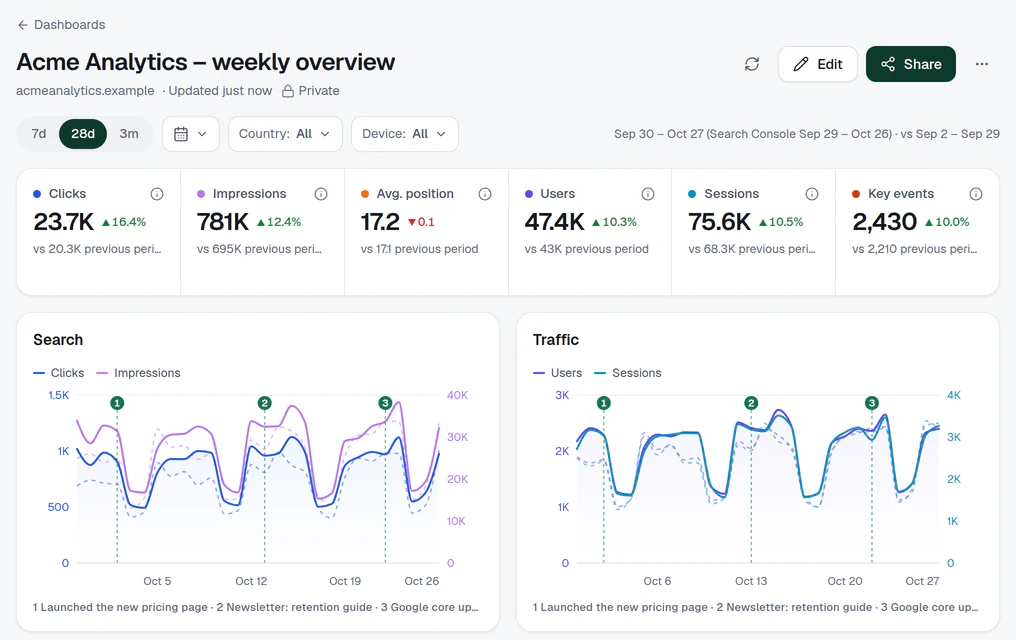
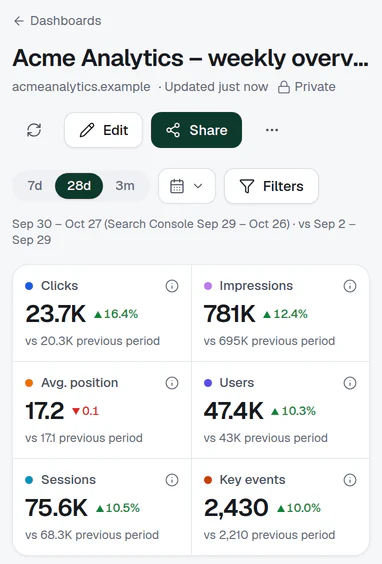
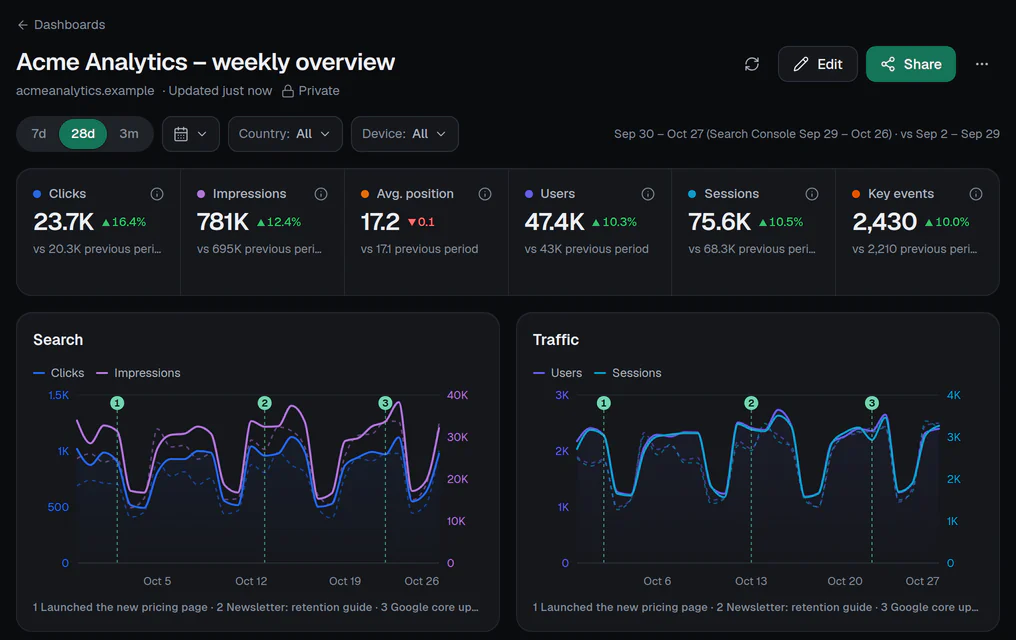
Dashboards

Client dashboards in minutes

  • Scorecards and charts from any site
  • Share a read-only link or embed
  • Templates, themes and dark mode
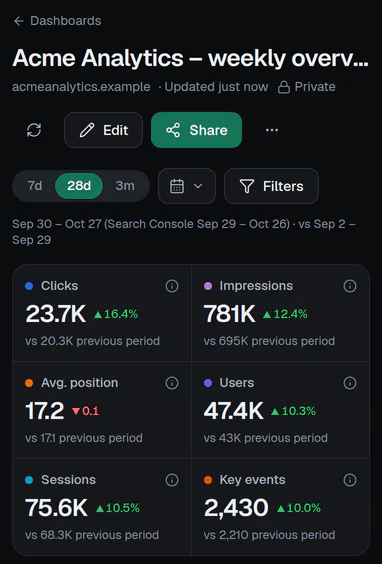
Open a dashboard
A sample dashboard: scorecards for clicks, impressions, position, users and sessions, and two charts

Real app screens · sample data · nothing you click here is saved

All of it, free, on your own sites.

ChatGPT & Claude

Ask your AI about your traffic

Paste one URL into ChatGPT or Claude. Read-only, free, and it runs on your own AI plan.

https://trafficclaw.com/mcp
  • ChatGPT
  • Claude
  • Claude Code, Cursor, VS Code

No AI account? Ask works inside TrafficClaw too.

Claudewith TrafficClaw connected

Which of my sites lost the most Google clicks this month?

Used top_movers

healthinsights.example lost the most: 37,602 clicks, down from 47,467. 2 more sites are down too:

  • healthinsights.example37.6K37,602down 20.8 percent versus previous period
  • searchmetrics.example230K230,220down 4.0 percent versus previous period
  • recipenest.example85.1K85,071down 5.5 percent versus previous period
Example answer from sample data · 13 read-only tools

Why free?

Most of it costs us very little to run

See pricing
  • Your data stays in GoogleWe only read and chart it, so there is no site limit.
  • AI runs on your planChatGPT and Claude answer on your own account.
  • Only Ask messages are paid5 free to start. More from $19 a month.
See pricing

FAQ

Before you connect

More in Security and data, or ask us.

Is TrafficClaw really free?
Yes. The portfolio, site pages, dashboards, the public leaderboard and the ChatGPT and Claude connector are free, with no site limit. Paid plans only add more Ask messages in TrafficClaw's built-in AI chat.
What can TrafficClaw see in my Google account?
Only what you allow when you sign in: read-only access to Google Analytics and Search Console, plus your name, email and profile photo to sign you in. TrafficClaw cannot change anything in Analytics or Search Console, and it never sees Gmail, Drive or any other Google data. Security and data lists exactly what we read and store.
Do I need to install a tracking script?
No. TrafficClaw reads the Google Analytics 4 and Search Console data you already collect. Nothing changes on your site.
How is this different from Looker Studio?
Looker Studio gives you a blank canvas: you connect each data source, build every chart and keep it working. TrafficClaw starts finished: a portfolio of every site, pages for each site with Analytics and Search Console side by side, and a ranked list of what to fix next. When you want your own layout, the dashboard builder has templates, and its links and embeds are read-only.
Why don't my numbers match Google's own screens exactly?
We read the same Google APIs, so the numbers come from Google. Small gaps usually come from the date range (each chart shows its dates), today's partial day, and Search Console data arriving about two days late. If a gap looks wrong, tell us and we will check it.
How many sites can I add?
Every Google Analytics 4 property and Search Console site your Google account can see shows up in your portfolio. There is no site limit on any plan.
Can I use it for client sites?
Yes, for any site your Google account can see. Share a read-only dashboard link, optionally with a password or an end date, or embed it on a client page. Clients do not need an account, and you can switch a link off at any time.
How does the ChatGPT and Claude connector work?
TrafficClaw runs a hosted MCP server. Add its URL in ChatGPT, Claude or another MCP client, sign in, approve read-only access for all of your sites or only some, then ask questions. You can revoke access at any time.
Can I delete my data?
Yes. Ask for deletion in Settings › Data & privacy, which sends the request to our support inbox, or email [email protected]. On request, we delete your account and all the data stored with it. You can also remove TrafficClaw's access at any time in your Google Account permissions.

See all your sites in one place.

Free, read-only, nothing to install, no card.

Explore the live demo